Since August 2026, writeback for Cloud-Managed Remote Mailboxes is now Generally Available with Cloud Sync.
This feature enables organizations to manage mailboxes directly in the Microsoft 365 cloud without relying on Exchange Server on-premises, while still writing mailbox-related informations back to the on-premises Active Directory.
Organizations can use this capability in several scenarios. This article describes the different scenarios, explains how each one works and helps understand how provisioning can work after remove Exchange on-premises.
Cloud-managed mailboxes and Cloud Sync from EXO to AD
When Active Directory is synchronized to Microsoft 365 using either Microsoft Entra Connect or Cloud Sync, cloud-based messaging objects (such as MailUsers or Mailboxes) become read-only in the cloud.
Any administration or modification of these objects must be performed from the on-premises Exchange environment. In this scenario, the Source of Authority (SOA) is considered to be on-premises, as it remains the authoritative location where these objects are managed and controlled.
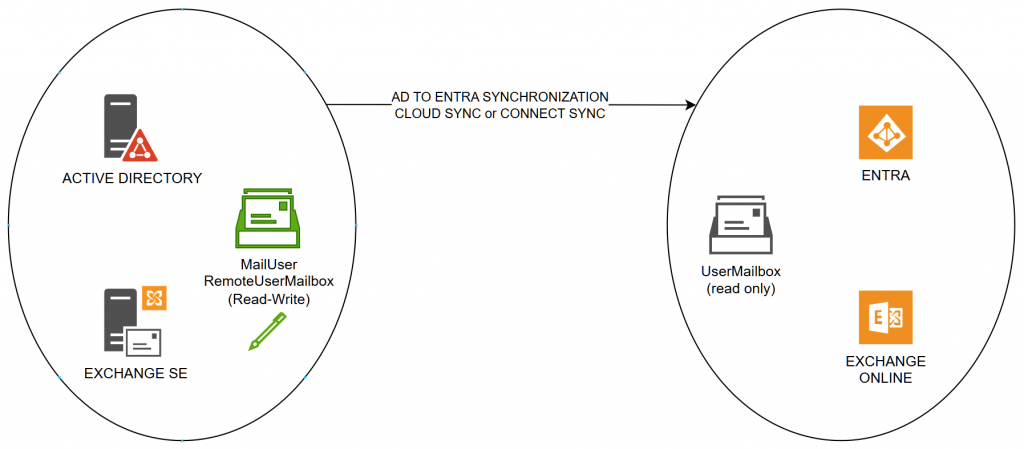
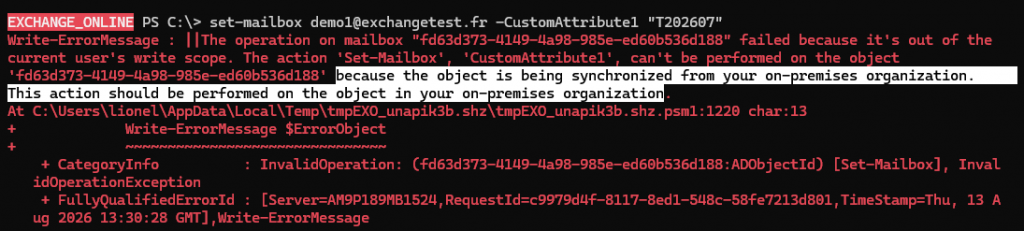
The following example illustrates an attempt to modify a mailbox in Microsoft 365 that is synchronized from an on-premises RemoteUserMailbox. Because the object is synchronized, it is considered read-only in the cloud.
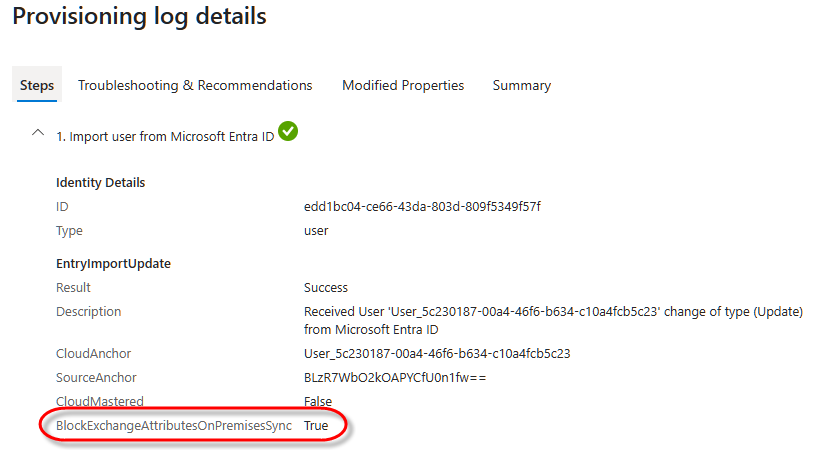
To transfer the Source of Authority (SOA) to the cloud, the IsExchangeCloudManaged property must be set to $true on a mailbox level.
Once this setting is enabled, Cloud Sync no longer synchronizes Exchange-related attributes from the on-premises environment to Microsoft 365. Instead, Exchange Online becomes the authoritative source for Exchange recipient management.
At this point, Exchange Cloud Sync Writeback is responsible for synchronizing supported Exchange attributes from Exchange Online back to the on-premises Active Directory.
Currently, 24 Exchange-related attributes are written back to on-premises Active Directory, while all other Exchange attributes continue to be synchronized from on-premises Active Directory to the cloud.
| Exchange properties write-backed (24 properties) |
|---|
| ProxyAddresses |
| ExtensionAttribute1 to ExtensionAttribute15 |
| MSExchExtensionCustomAttribute1 to MSExchExtensionCustomAttribute5 |
| MSExchRecipientDisplayType |
| MSExchRecipientTypeDetails |
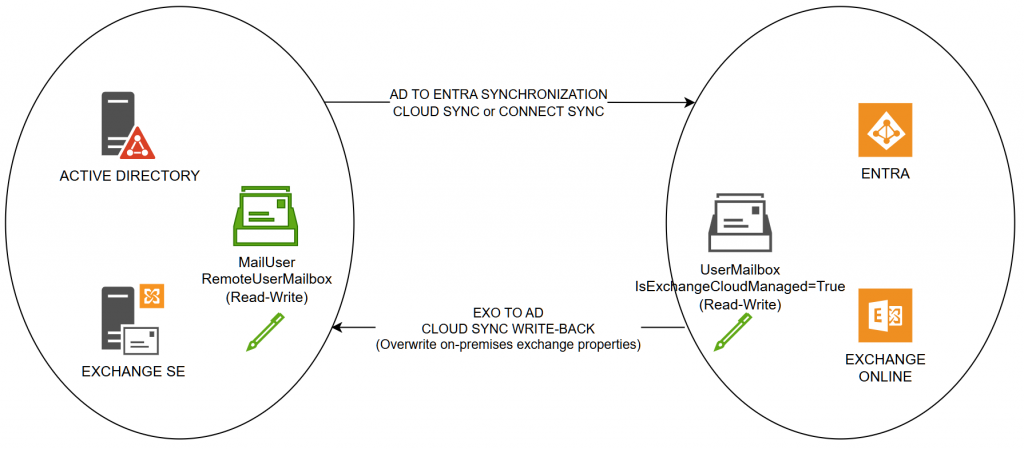
Note: It remains possible to modify any of the writeback-enabled attributes directly in the on-premises environment. However, once the Source of Authority (SOA) has been transferred to the cloud, changes made on-premises to these attributes are no longer synchronized to Exchange Online. During the next Cloud Sync Writeback cycle, the values from Exchange Online overwrite any changes made on-premises, ensuring that both environments remain consistent and aligned with the cloud-managed configuration.
Now we can examine the different provisioning and write-back scenarios:
| Is Exchange on-premises present? | Where are mailboxes created/enabled? |
|---|---|
| YES | Mailbox created as remote mailbox or moved from on-premises to EXO |
| YES | Mailbox created direclty on EXO |
| NO | Mailbox created direclty on EXO |
⚠️ Be careful not to enable SOA on the cloud side at the OrganizationConfig level while you are still creating or hosting on-premises mailboxes. Once this option is enabled, the online MailUsers that are supposed to represent those mailboxes will no longer be created in the cloud.

Provisioning – Different cases
Mailbox created as remote mailbox or moved from on-premises to EXO
When a remote mailbox is created, or when a mailbox is migrated to Exchange Online (EXO), a remote mailbox object exists on-premises while the corresponding mailbox resides in the cloud.
⚠️ Be careful not to set IsExchangeCloudManaged = true immediately after moving a mailbox, as this may corrupt the on-premises object. The on-premises object may no longer be recognized as a remote mailbox and could instead be treated as a mail user object with a RecipientTypeDetails value of UserMailbox. Microsoft’s guidance is to wait a few hours before enabling cloud management.
After SOA is transferred to the mailbox object using IsExchangeCloudManaged = true, synchronization from on-premises to Exchange Online will no longer update the 24 Exchange attributes that are managed through the write-back synchronization process.
- ✅ If one of the Exchange attributes is modified in Exchange Online, it will be synchronized back to the on-premises environment.
- ✅ It is possible to change the mailbox type in Exchange Online (for example, from Regular to Shared, or vice versa). This information is written back to the on-premises environment because it is stored in the MSExchRecipientDisplayType and MSExchRecipientTypeDetails attributes.
- ✅ The remote mailbox object remains present in the Exchange on-premises configuration.
- 🟥 If one of the Exchange attributes is modified on-premises, it will be overwritten by the value from the cloud during the next write-back synchronization cycle.
Mailbox created direclty on EXO
When a license is assigned to an Entra user (synchronized from Active Directory), an Exchange Online mailbox is created.
⚠️ Be careful not to set IsExchangeCloudManaged = true immediately after mailbox creation. MSExchRecipientDisplayType and MSExchRecipientTypeDetails may not have been replicated yet. Microsoft’s guidance is to wait a few hours before enabling cloud management.
After SOA is enabled for the mailbox object using IsExchangeCloudManaged = true:
- ✅ If one of the Exchange attributes is modified in Exchange Online, it will be synchronized back to the on-premises Active Directory user object.
- ✅ It is possible to change the mailbox type in Exchange Online (for example, from Regular to Shared, or vice versa). This information is written back to the on-premises environment because it is stored in the MSExchRecipientDisplayType and MSExchRecipientTypeDetails attributes.
- 🟥 The remote mailbox object does not exist on-premises (even if Exchange Server is still present).
- 🟥 If one of the Exchange attributes is modified directly on-premises (for example, in Active Directory through LDAP), it will be overwritten by the value from the cloud during the next write-back synchronization cycle.
Summarize and recommandations
| Use case | Cloud sync write-back impact after moving SOA to cloud |
|---|---|
| Mailbox created as remote mailbox or moved from on-premises to EXO | ✅ Replicate 24 attributes from EXO to on-premises AD. ✅ Permits modify the mailbox type on cloud side and to replicate this information on-premises. 🟥 If one of the Exchange attributes is modified directly on-premises, it will be overwritten by the value from the cloud during the next write-back synchronization cycle. |
| Mailbox created direclty on EXO | ✅ Replicate 24 attributes from EXO to on-premises AD. ✅ Permits modify the mailbox type on cloud side and to replicate this information on-premises. 🟥 If one of the Exchange attributes is modified directly on-premises, it will be overwritten by the value from the cloud during the next write-back synchronization cycle. 🟥 Doesn’t permit to see the on-premises object as a remote mailbox (if Exchange on-premises is still present) |
- ⚠️ Be careful not to enable SOA on the cloud side at the OrganizationConfig level while you are still creating or hosting on-premises mailboxes.
- ⚠️ Always wait a few hours between a mailbox creation/migration before setting IsExchangeCloudManaged =True at the mailbox level.
- 💡 When you transfer the SOA to the cloud, populate a custom attribute with a tag like “SOA_CLOUD_$(get-date())” that is replicated to on-premises AD.
- 🟥 When the mailbox SOA is cloud based do not modiy on-premises Exchange attributes.
By Lionel TRAVERSE
Microsoft 365 Certified / MVP Microsoft 365 & Graph